Rated 5.0/5.0 by 2 users


Additional Links
You may find some useful information by following these links

https://modrinth.com/mod/create-radars
Share this post


Create: Radars Mod
Automatically detect and strike threats, with advanced radar systems and automatic turrets!
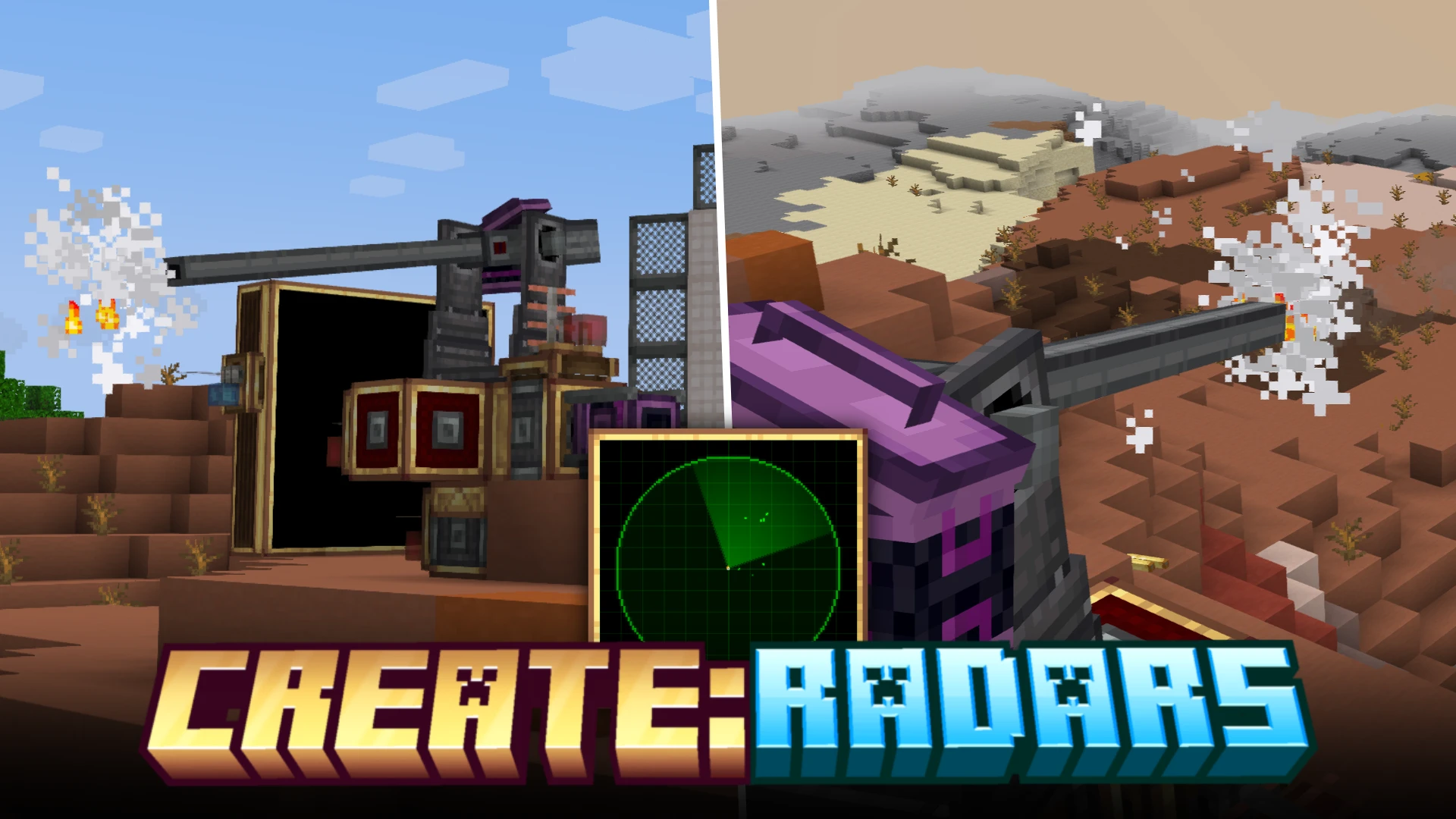

If you are entirely new to Create: Radars, you might get confused with the various block introduces by this mod. Do not worry, as we will learn the functionalities of the various new mechanisms introduced by this mod, with the help of this guide. The goal of this guide is to provide a step-by-step tutorial, while also providing an intuitive understanding of the features of this mod. Let us now build our own automatic detect and strike turret system.
Building a Functional Radar Assembly
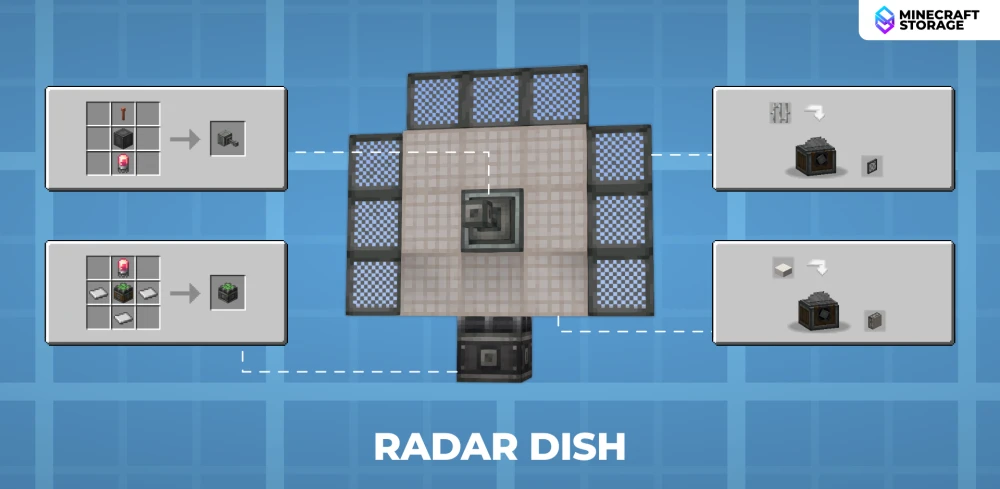
A radar dish is the basic element of this system. It detect mobs and entities within your world and provide that data to you. Let us now build one.
Building a Radar Dish
Note that plates and dishes function identically; the difference is purely aesthetic. The number of plates you have on your dish determines the detection radius of the dish. It follows this formula:
Maximum Range = (Total Dishes or Plates) x 10
Rotating the Radar Dish
The rotational power required to rotate the radar dish has to be provided from below the radar bearing block. The radar only scans the area the receiver is pointer at, at an instance. Therefore, the speed of rotation determines how often an area gets scanned, also known as the refresh-rate. We will take a look at this later.
Place your Monitor
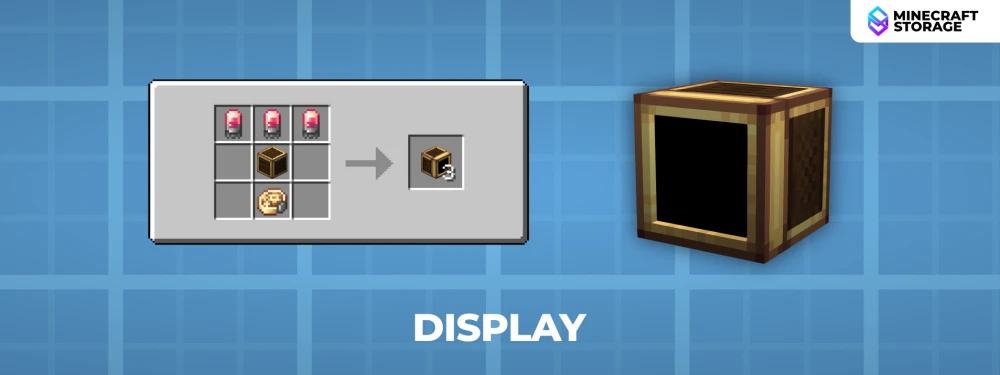
Using the recipe above, you can craft screen/television blocks. The basic block itself only provides a display that is 1 block-square in dimension. But you can place multiple screen blocks in a square to make them connect and function as a larger display.
For our guide, we will use a large 4x4 display.
Link the Screen to the Dish
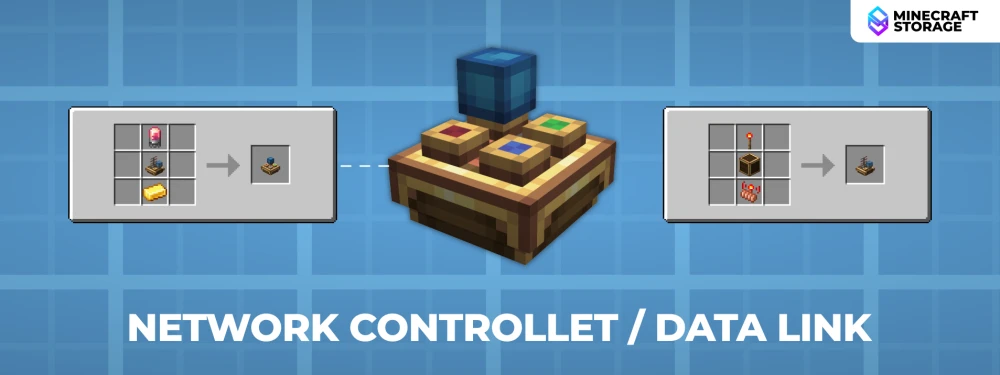
To link the screen and the radar dish, we need to craft a network controller and some data links. Their recipes are given above.
Scanning Efficiency: The faster you spin the Radar Bearing, the faster your radar sweep sweeps across the screen. This is the "refresh-rate". A higher refresh rate means entities will be detected and updated on the display faster.
Once set up correctly, your display will show markers for any mob in our world. Let us now learn how to configure the system. We basically tell the system what to detect and what to strike.
Configuring Radar Target Selection and Filters
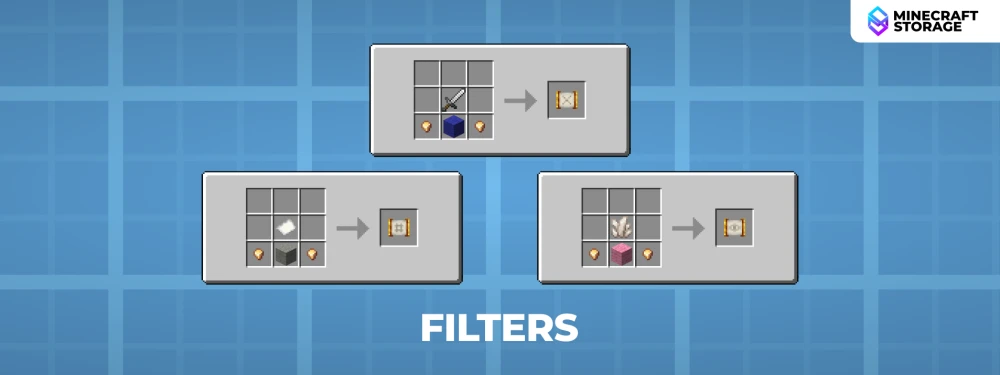
The mod has three filters that can be individually placed onto the Network Controller. These are the Identification Filter, Detection Filter and Targeting Filer. They can be crafted using the recipes given above.
The Three Filters
You can hold each filter in your hand and simply right-click to open their configuration. Of the three filters, we are most interested in the Detection and Targeting Filters. The Identification Filter is used to identify specific players and content from other mods.
Detection Filter : This filter allows you to toggle detection for various entities. This includes players, hostile mobs, passive mobs, projectiles, etc. Press them to make them green, thereby enabling detection. When enabled (green), these entities will be detected by the radar dish and will be shown on the display.
Targeting Filter: This filter allows you to toggle targeting (attack) for various entities. The red/green means disable/enable. In the image above, we have hostile mobs enabled. This means, the radar will detect hostile mobs and target them. To make them attack automatically, enable the Auto Target option.
Input the Filter
Now that you have set your required filters, let us now put them into action.
You can always pick back up the filters from the Network Controller by right-clicking on it with an empty hand. You can then adjust your filters as required and place them back.
Filters in Action
Let us now see the filters in work, so that you get a better understanding.
Once you have a artillery system in place, you can click on individual target on the display to target and attack them.
Setting Up Auto-Aiming and Artillery Systems
Building a radar detection system is not enough. We now need to build a system to target and shoot at the detected threats. This is done with the help of the Create Big Cannons mod, which introduces the mechanisms required to set-up an automatic turret.
Building an Auto-Turret
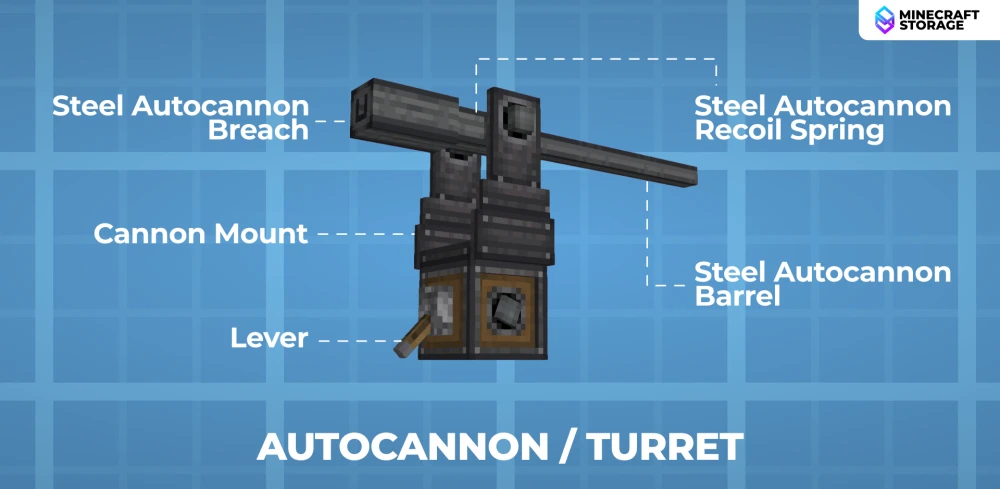
We build a simple auto-turret using items introduced by the Create Big Cannons mod. The blocks and items used to build the turret are showcased in the image above. Simply build it as shown above. Make sure a lever is placed and activated as shown.
Pitch and Yaw Mechanics
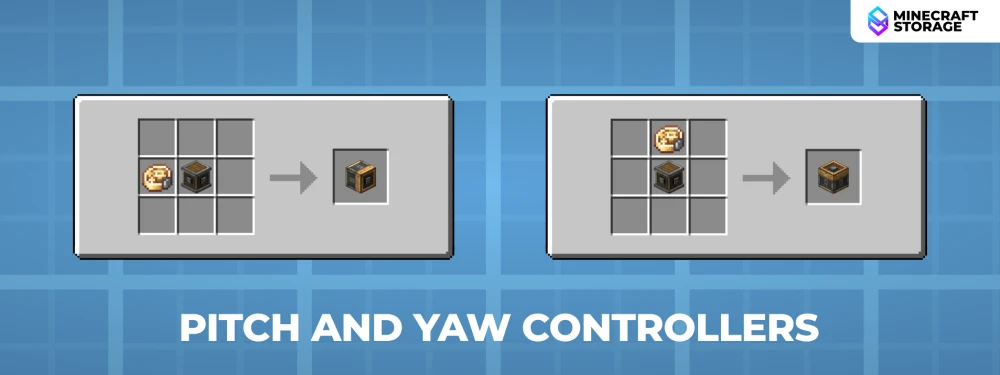
Artillery systems introduced by Create Big Cannons do not rotate or aim by itself. For that purpose, we use two new blocks introduces by Create: Radars - Auto Pitch Controller and Auto Yaw Controller. The recipes to craft them are given above.
Double-check whether all the blocks are placed in the correct orientation, or the system will fail.
Establish the Weapon Link
We need to properly link the Pitch and Yaw Controller blocks to the Cannon Mount block. This is done using Data Links. Follow these steps.
Once this is done, the next step is to attach the Fire Controller.
Link the Fire Controller
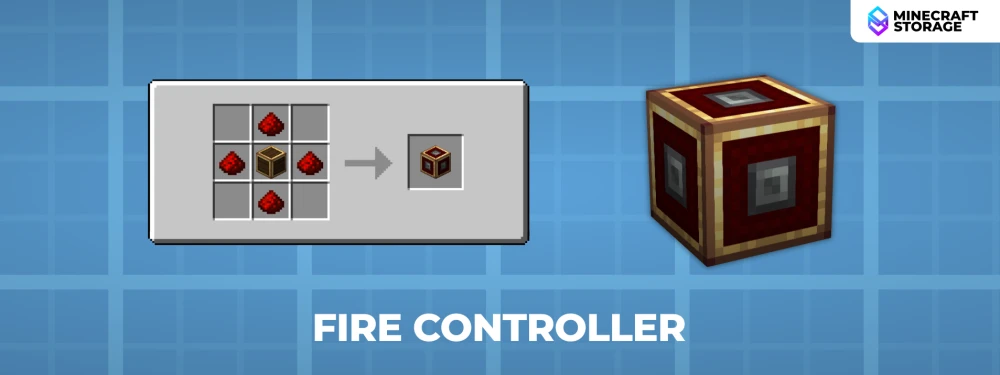
The Fire Controller is another block introduced by Create: Radars. As the name suggests, this block controls the firing of the turret. Craft it using the recipe shown above.
The auto-turret is now mostly done. Make sure to provide ammunition to the turret gun.
The auto-turret is now locked and loaded. Let us now link it to the radar system.
Connecting the Turret and Radar System
Let us now connect the auto-turret to the radar detection system.
The System In Action
We have already set the targeting filter to target and attack hostile mobs. Let us now summon in some hostile mobs and see if the system detects it and the turret attacks them.
Automatic
As you can see, the system automatically detects and attacks hostile creatures. They get absolutely obliterated by the turret.
Manual
We had already enabled passive mobs in the Detection Filter, but disabled them in the Targeting Filter. Therefore, the radar will detect them, but not attack them. In the images above, as you can see, we can open te display and click on the passive mob and initiate an attack manually.
Conclusion
We have successfully built a radar detection and auto-turret system using Create: Radars and Create Big Cannons. We have explained the functionality of each block used very well. Let us know what you think in the comments.
Looking for more create content? interesting
Here are some more interesting addons
 mod
modAdds the Trading Depot, a block that works flawlessly in combination with Create mod mechanism to let you fully automate villager trading.