

Not rated yet


Additional Links
You may find some useful information by following these links

https://www.curseforge.com/minecraft/mc-mods/create-trading-floor

https://modrinth.com/mod/create-trading-floor
Share this post


Create: Trading Floor Mod
Adds the Trading Depot, a block that works flawlessly in combination with Create mod mechanism to let you fully automate villager trading.
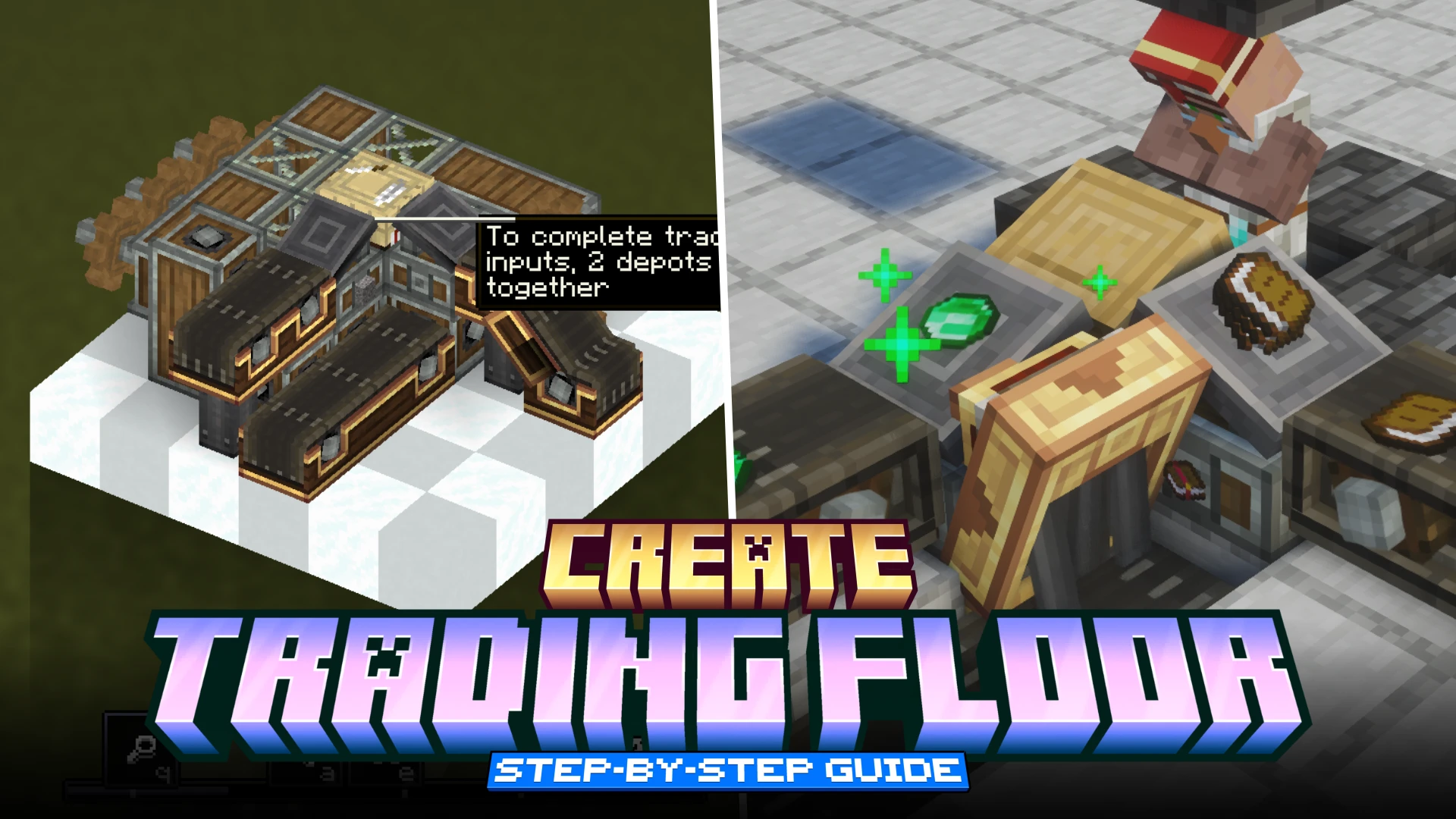

The Create: Trading Floor mod only adds a single new block into the game - The Trading Depot. From the article description, it is very clear that this is an addon for Create mod and the trading depot block allows automate villager trading. This is a step-by-step guide that will help absolute beginners understand the full utility of the Trading Depot block.
The Basics
Crafting Recipe
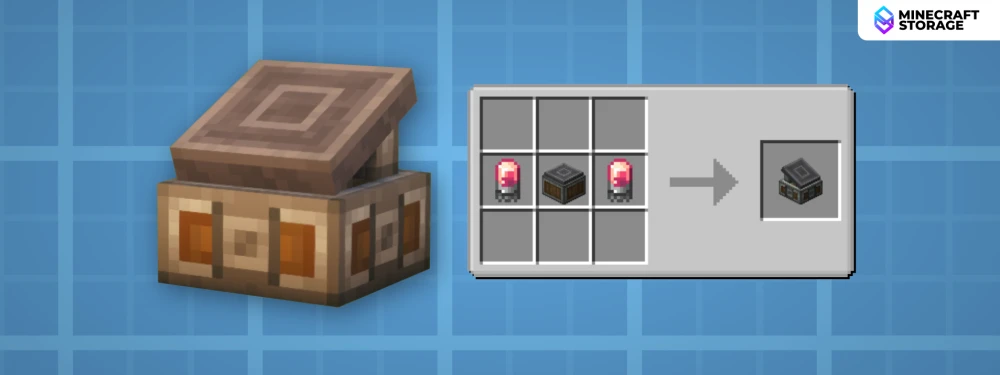
Using the above recipe, you can craft a Trading Depot block. The require crafting ingredients are from Create mod. Once crafted, you can place it down on any solid surface.
The Trading Depot
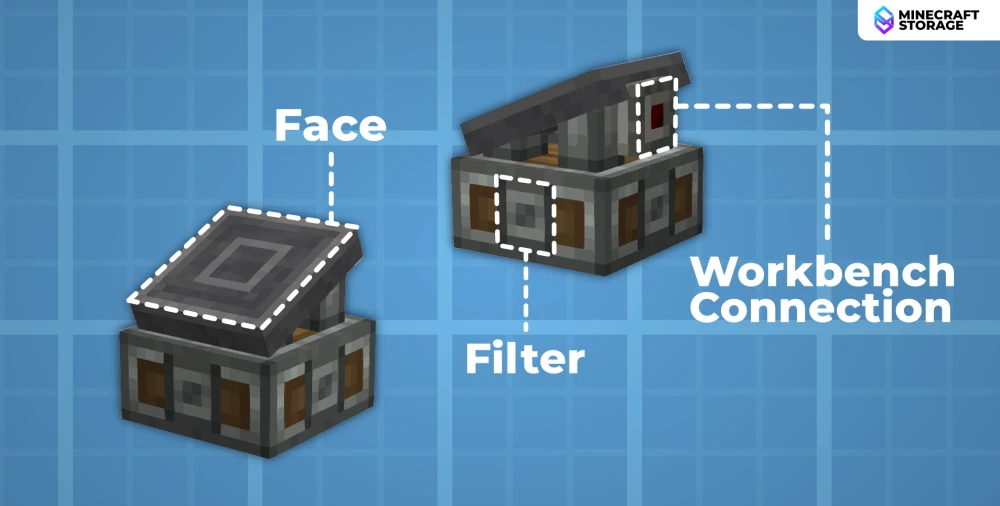
The Trading Depot block itself has certain features on its surface. They are showcased in the above image.
The Face: The upper surface of the depot block. Players and villagers can place/pick items on this surface. This is where trades are executed.
Workbench Connector: The depot block must be placed in such a way that the side with this feature must fall adjacent to the workbench of the target villager.
The Filter: You can right-click on the filter with any item to set it as the "filter item". Basically, the filter item is the output you want from the trade. If a villager is trading out the <filter item> and the required items for the trade are placed on the depot face, the trade will get executed. The filter helps prevent unnecessary trades from being executed.
These might sound confusing, but you will get a better understanding later in this guide. This guide explains the full functionality of the block by actually building an automatic trading system using the trading depot block.
Villager Set-Up
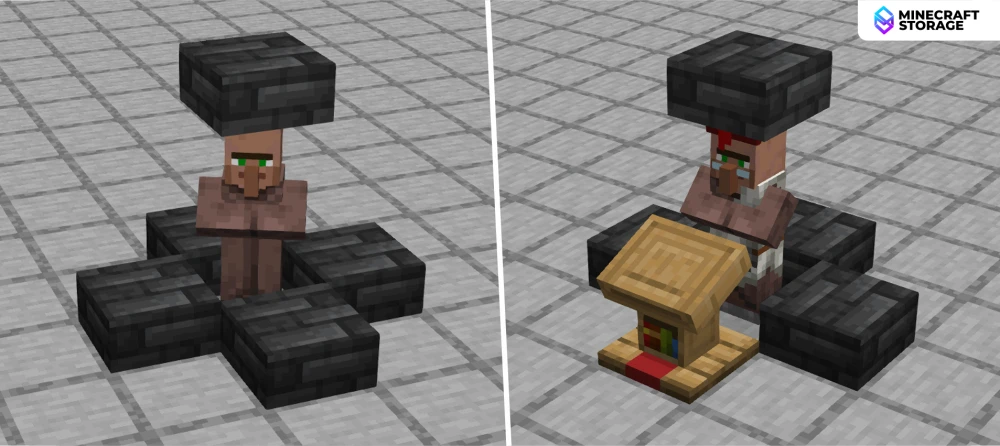
The ideal set-up for a automatic trading system is to trap a villager in a one-block space. Once trapped, place the required workbench close to the villager as shown. For the guide, we will use a lectern workbench to obtain a librarian villager.
Connecting the Depot
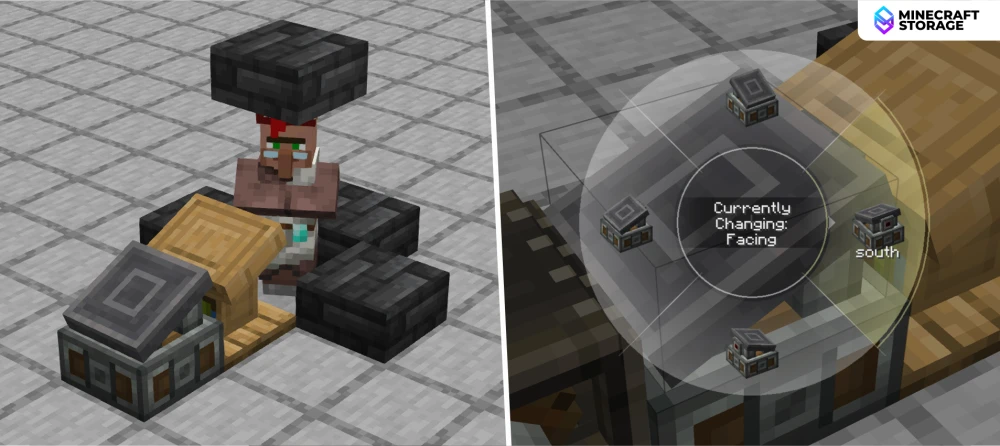
The next step is to place a trading depot block adjacent to the workbench(lectern). The depot can be placed on any side of the lectern. The only condition is that the face with the workbench connector must be directly adjacent to the workbench, as discussed above. You can use the Create wrench tool to configure the placement with ease.
Now we have covered the basic features of the depot blocks and its functionalities. Let us now build an actual villager trading system that uses a simple belt input.
Single Input Trading
Belt Input
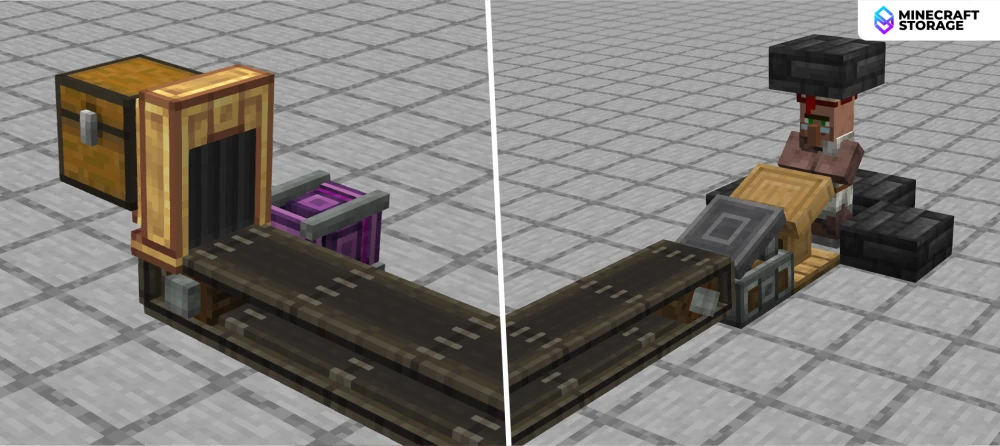
A conveyor belt running directly into the depot block is built as shown above. For the sake of simplicity of this guide, the belt takes input from a chest via a funnel. This will be the input belt that will place items directly onto the depot block.
Choosing the Trade
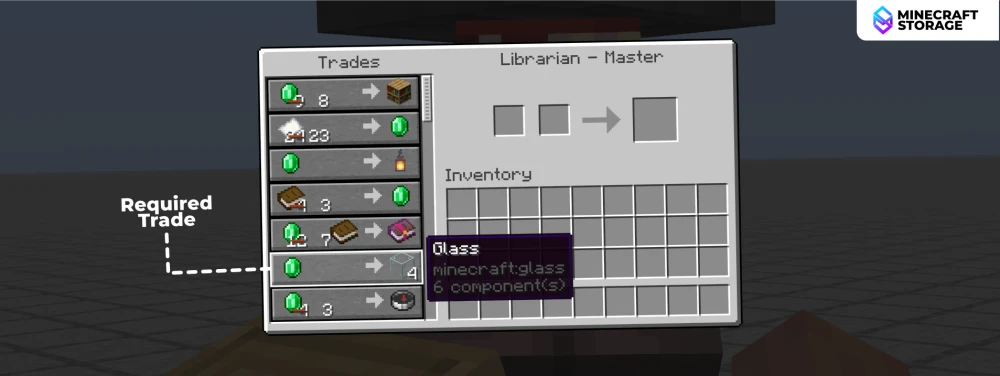
Right-click on the librarian to open its trading interface. You can see the different trades that are offered. For this guide, we will choose the (1 Emerald -> 4 Glass) trade that is marked in the image above. On closer look, you can see that there are other trades offered that require emeralds as input. How do we ensure that our required trade is the one that gets executed?
Trade Filter
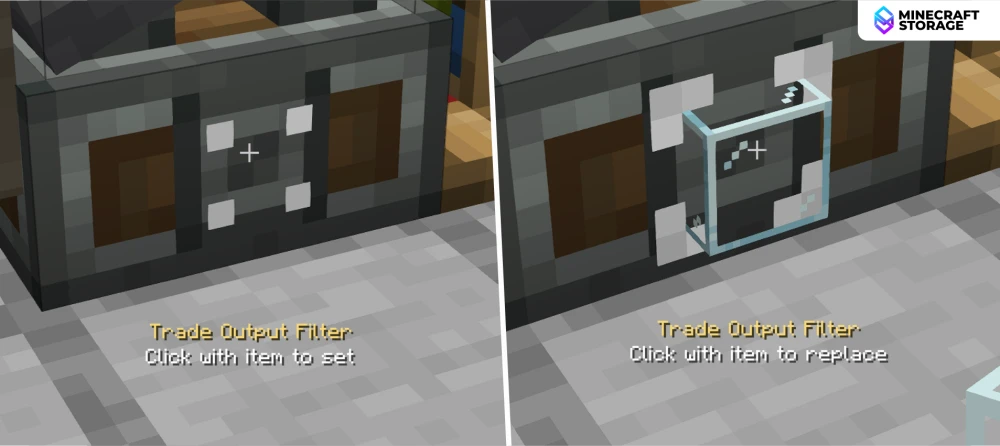
We had discussed the filter feature on the depot surface previously in this guide. Since our required trade output is glass blocks, we will right-click on the filter with a glass block. If done correctly, you will notice a glass block item on the depot surface.
If no filter item is set, the first trade from the trade list in the villager GUI that can be executed with the given input will be executed.
Executing the Trade
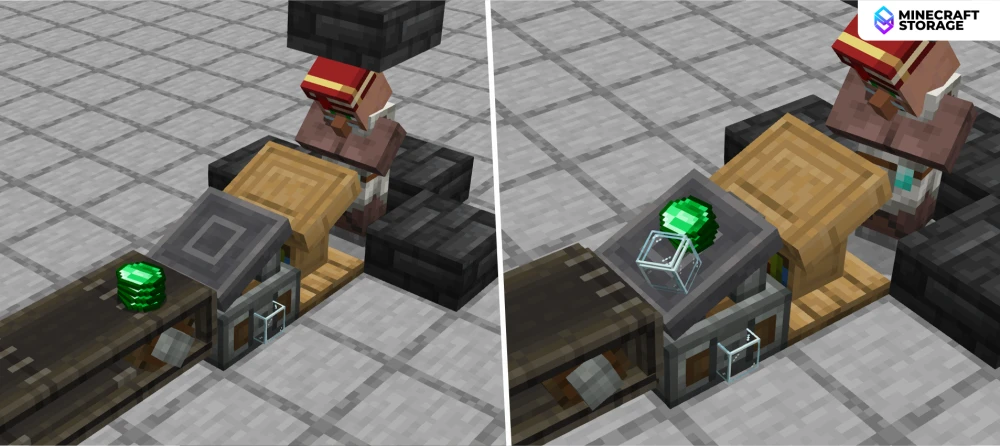
Once the filter item is set, you can activate the belt to input emeralds onto the depot. As you an see in the image above, the villager has collected a few emeralds and placed glass blocks on the depot face in return. You can simply right-click on these glass blocks to collect them. But we are here to automate things!
Output Belt
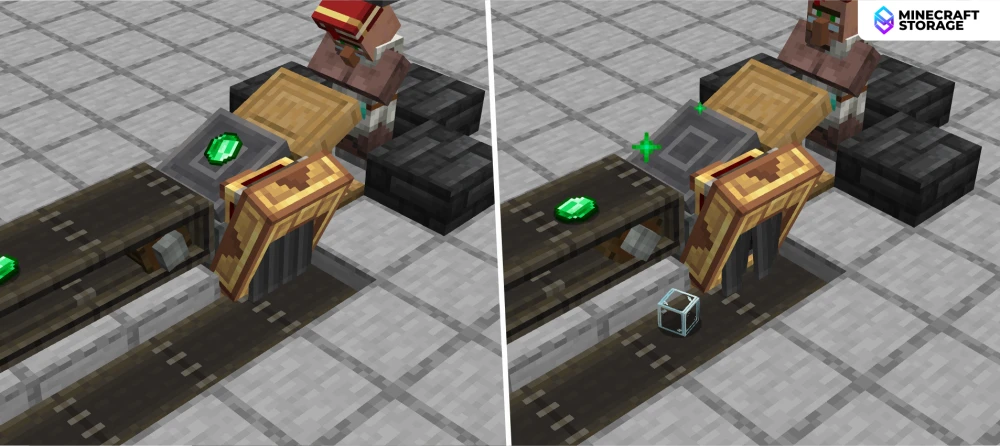
We place a Create funnel adjacent to the depot block. This funnel will only collect the trade output. The funnel then outputs the collected items onto a secondary belt that will take the items to your preferred storage.
And that is how we automate villager trading when the trade only requires a single input. Let us now take a look at the case, where the trade require two inputs.
Dual Input Trading
Choosing the Trade
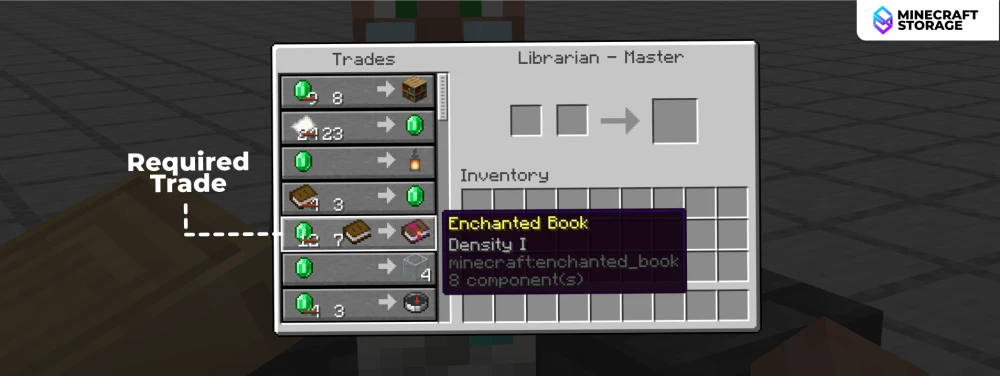
For this example, we are choosing the (7 Emerald + 1 Book -> 1 Density I Enchanted Book). Unlike the previous case, this trade requires both emeralds and books as input. Let us take a look at how we can achieve this.
Dual Input
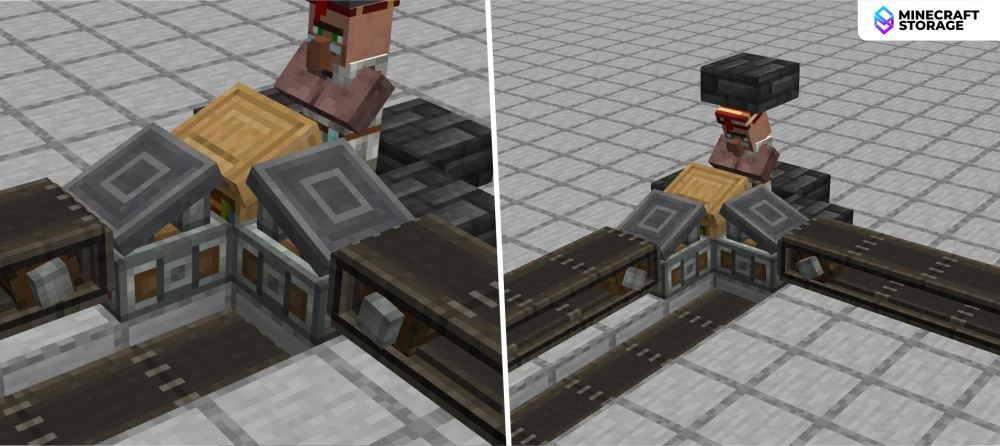
One trading depot can only accept one item input. So for two inputs we place two depot blocks adjacent to the same workbench, as shown in the image above. Both depots have their own input belts.
Trade Filter
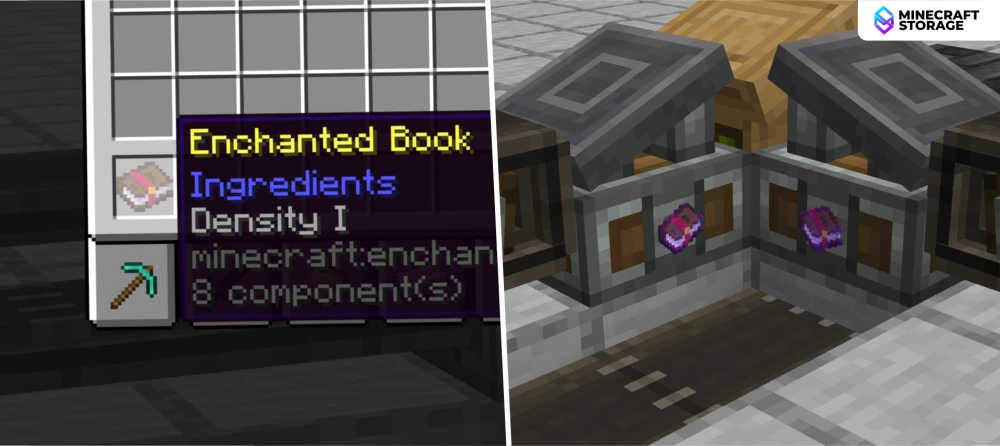
With both emeralds and books flowing in, there are numerous trade options that can get executed. We need to ensure that only the trade with the Density I Enchantment Book gets executed. To do this, we set Density I Enchantment Book as filter items on both the depots. Now a trade will only be executed if the combined input of both the depots meet the cost of one Density I Enchantment Book.
Upon consulting the mod creator, only one of the depots require to have a filter item in order for setting the trade. But due to some bug with the current version, both depots require the same filter item. If you are reading this in the future, the bug might be fixed, and you can try setting the filter item only on one of the depots.
Trade Output
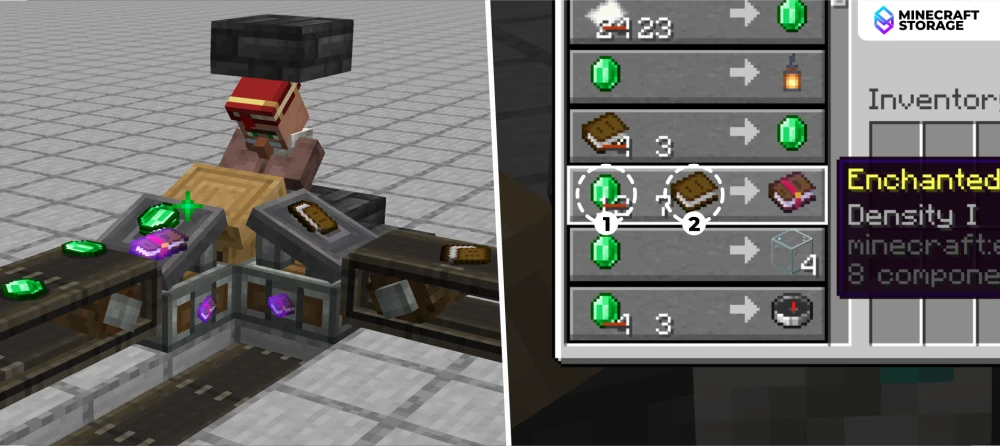
Once the trade is executed, the villager will place a Density I Enchantment Book on the depot with the emerald input. It is important to note that the villager will place the output only on the emerald input depot in this case, and not on the book input depot. This is because, on the trade shown in the villager GUI, emeralds are shown before the books. The output will always be placed on the depot inputting the first item of the trade.
Output Belt
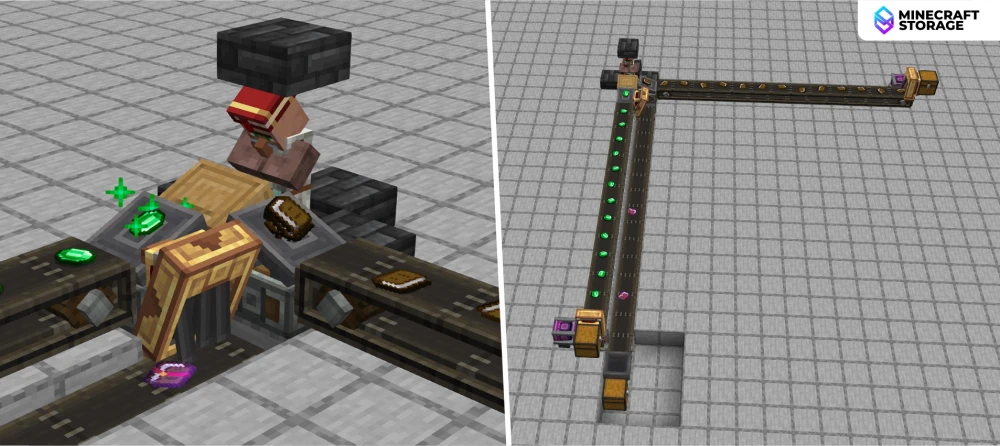
Since we can confirm that the output will always be placed on the emerald input depot, we place a funnel output leading to an output belt. This belt will carry the trade output to your preferred storage location.
Conclusion
That's it! You have now learned how to use the trading depot block efficiently. You can now combine this knowledge with Create mod knowledge to build smaller systems that require way less resources. You can also design modules that can be stacked, so that you can build a trading hub that automatically executes trades with multiple villagers of different professions.
Other Create mods interesting
Here are some more interesting addons

 mod
modEnhances Minecraft's rendering engine for high-performance custom models and shaders, utilizing advanced GPU optimizations.
 mod
modAutomatically detect and strike threats, with advanced radar systems and automatic turrets!
 mod
modEnergy-based weapons of Mass Destruction! Shoot powerful laser cannons and rail/coil guns!
 mod
modIn-game light behavior like never before. Adds new spotlights that can be used to light up specific areas with high configurability.
 mod
modNo more hours wasted on manually mining for ores! Automate the mining process with the help of Create compatible drilling machines.
